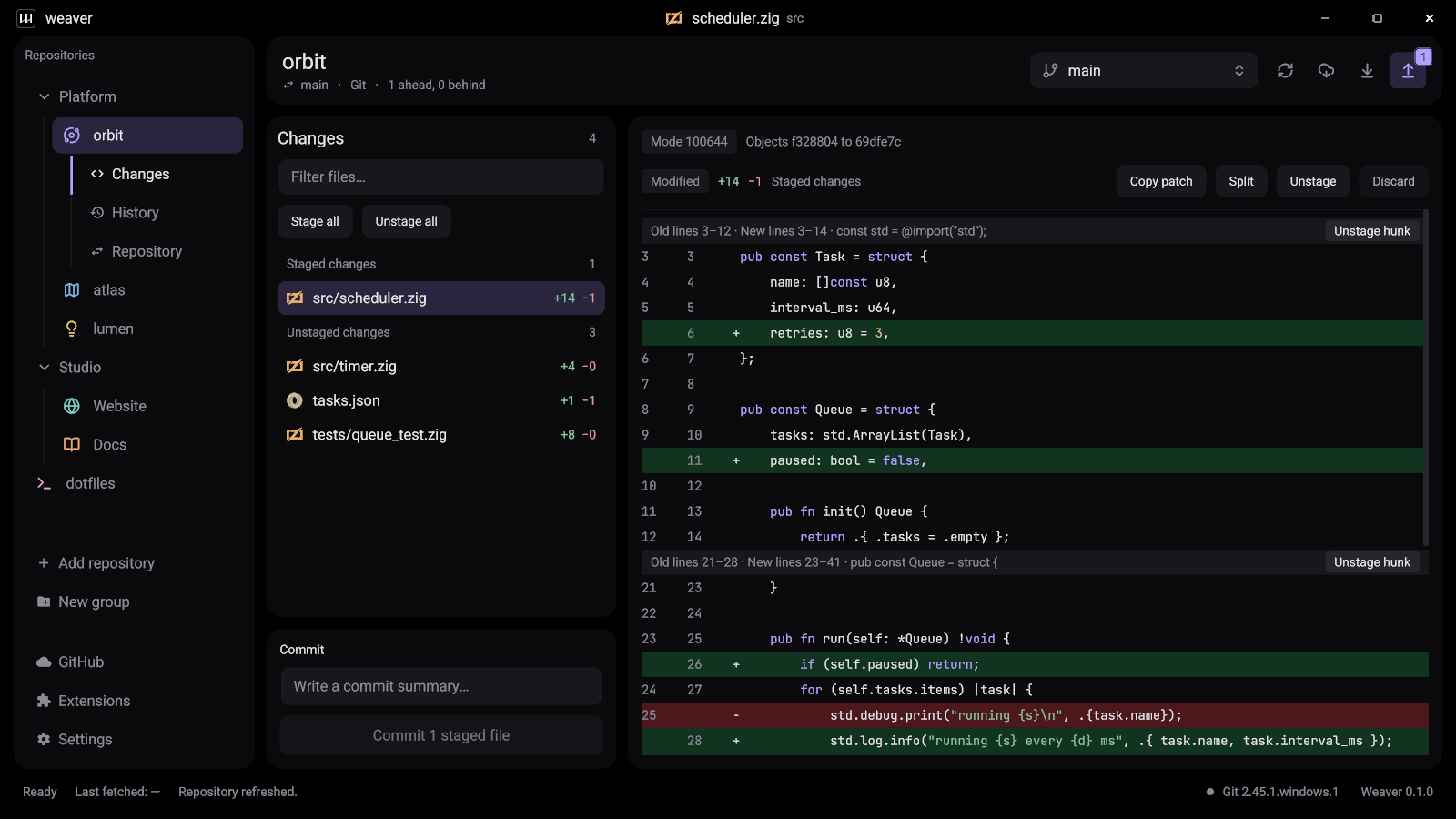
A Git GUI client turns the commands you type all day (git status, git add -p, git log, git rebase) into something you can see and click. A good one makes you faster and catches mistakes before you commit them. A bad one is a slow window you learn to avoid.
We compared ten of the most popular Git clients for Windows, macOS and Linux to find the best Git GUI in 2026. One disclosure first: we make Weaver, so it is on this list and it is our recommendation. We have tried to earn that by being specific about where every other Git client is stronger, including the places Weaver is still behind.
The short answer
- Best Git client overall: Weaver. Free, open source, native and fast, on all three desktop platforms.
- Best for GitHub pull requests: GitHub Desktop.
- Best paid Git client: Fork for a one-time price, Tower if you want the most polish.
- Best for visualising a complex commit graph: GitKraken Desktop.
- Best Git client in the terminal: lazygit.
- Best if you never want to leave your editor: the Source Control view in VS Code.
What makes a good Git client
Every Git GUI can stage, commit, pull and push. The differences that matter in daily use are these.
- Speed. You open your Git client dozens of times a day. Native apps start instantly and stay responsive on large repositories. Electron apps carry a full copy of Chromium and tend to be slower and heavier.
- Platforms. If your team is split across Windows, Mac and Linux, a cross-platform Git client means one tool to learn. Several well-known clients have no Linux version at all.
- Price and licence. Some Git clients are free and open source, some are free with limits, and some need a subscription for private repositories.
- How it treats your Git. A client that runs the Git you already installed respects your config, hooks, commit signing and Git LFS filters. A client with its own bundled Git can behave differently from your terminal.
- Depth. Hunk staging, side-by-side diffs, interactive rebase, stashes, conflict resolution and pull requests are where clients diverge.
Git clients compared at a glance
| Git client | Platforms | Built with | Price | Open source |
|---|---|---|---|---|
| Weaver | Windows, macOS, Linux | Native (Zig) | Free | Yes (MIT) |
| GitHub Desktop | Windows, macOS | Electron | Free | Yes (MIT) |
| GitKraken Desktop | Windows, macOS, Linux | Electron | Free for public and local repos, subscription for private | No |
| Sourcetree | Windows, macOS | Native | Free | No |
| Fork | Windows, macOS | Native | One-time licence, free evaluation | No |
| Tower | Windows, macOS | Native | Annual subscription, free trial | No |
| Sublime Merge | Windows, macOS, Linux | Native | One-time licence, free evaluation | No |
| SmartGit | Windows, macOS, Linux | Java | Commercial licence, free for some non-commercial use | No |
| lazygit | Windows, macOS, Linux | Terminal (Go) | Free | Yes (MIT) |
| VS Code | Windows, macOS, Linux | Electron | Free | Mostly |
Reviewed in October 2026. Prices and plans change often, so check each vendor’s site before you buy.
The 10 best Git clients
1. Weaver
Weaver is a free, open-source Git desktop client for Windows, macOS and Linux. It is written in Zig and draws its own interface on the GPU, with no Electron, Chromium or webview inside. The Windows download is about 5 MB and the window is ready the moment it opens.
It covers everyday Git properly: syntax-highlighted diffs in unified or side-by-side view, staging by file or by hunk, branches, merge, rebase, cherry-pick, revert, stashes and tags, in-app conflict resolution and built-in Git LFS tools. It runs the Git you already have, so hooks, commit signing and credentials behave exactly as they do in your terminal. It works with GitHub, GitLab, Bitbucket and any self-hosted Git server, and it comes with eleven themes and an extension API you can target from any language.
Where it falls short: Weaver is a development preview. It has no pull request features yet, it stages hunks but not single lines, the builds are not code-signed, the Mac version is Apple Silicon only and the Linux version needs Wayland.
Best for: developers who want a fast, lightweight, free Git GUI on any platform. Download Weaver.
2. GitHub Desktop
GitHub Desktop is the free, open-source Git client from GitHub, and for many people it is the first Git GUI they use. It is simple and friendly, and its pull request integration is excellent: you can create a pull request, check one out and see its checks without leaving the app. It can also stage individual lines.
The trade-offs are that it is an Electron app, there is no official Linux build, it keeps only one stash per branch, and it runs a bundled copy of Git rather than your own.
Best for: beginners and teams whose work lives in GitHub pull requests. We keep a detailed, line-by-line page on Weaver vs GitHub Desktop if you are deciding between the two.
3. GitKraken Desktop
GitKraken Desktop is the most feature-rich Git client here. Its commit graph is the best known in the business, and it adds pull request management, issue tracker integrations, workspaces for groups of repositories and AI-assisted commit messages. It runs on Windows, macOS and Linux.
It is also the heaviest. GitKraken is built on Electron, and the free plan only covers local and public repositories, so private repositories on a hosting service need a paid subscription.
Best for: teams who want one commercial tool for Git, pull requests and issues, and who are happy to pay per seat.
4. Sourcetree
Sourcetree is Atlassian’s free Git client for Windows and macOS. It exposes a lot of Git, including interactive rebase and Git-flow helpers, and it integrates naturally with Bitbucket and Jira.
It is closed source, it has no Linux version, and many users find its dense interface slow on large repositories.
Best for: teams already invested in Bitbucket and the Atlassian stack.
5. Fork
Fork is a fast, native Git client for Windows and macOS with a loyal following. Its interactive rebase, merge-conflict resolver, image diffs and blame view are all excellent, and it rarely gets in your way.
Fork is a paid product: you can evaluate it for free, then buy a one-time licence. It is closed source and there is no Linux version.
Best for: professionals on Windows or Mac who want a polished native Git client and prefer to pay once.
6. Tower
Tower is the most polished Git client on the Mac, with a Windows version too. It has undo for almost any Git action, drag-and-drop branching, strong pull request support and good learning material for people new to Git.
It is sold as an annual subscription with a free trial, it is closed source, and it does not run on Linux.
Best for: Mac developers and teams who value polish and support, and will pay yearly for it.
7. Sublime Merge
Sublime Merge comes from the makers of Sublime Text and shares its custom native toolkit, which makes it one of the fastest Git clients available on Windows, macOS and Linux. It offers line-by-line staging, powerful commit search and a built-in three-way merge tool, and it shows you the Git command behind every action.
It is closed source and needs a paid licence for continued use, though the evaluation has no enforced time limit.
Best for: Sublime Text users, and Linux developers who want a fast commercial Git GUI.
8. SmartGit
SmartGit is a long-established Git client for Windows, macOS and Linux. It is very complete, with its own diff and merge tools, Git-flow support and integrations for GitHub, GitLab and Bitbucket.
It is a Java application with a busy interface, and it is commercial software, although free licences are available for some non-commercial, educational and open-source use.
Best for: power users who want every Git feature in one window on any operating system.
9. lazygit
lazygit is not a desktop app. It is a free, open-source terminal interface for Git, driven entirely from the keyboard, and it is superb at staging lines, rebasing interactively and moving commits around. It runs anywhere a terminal does, including over SSH.
There is a learning curve, and reading large diffs in a terminal is less comfortable than in a graphical side-by-side view.
Best for: keyboard-driven developers who live in the terminal.
10. Visual Studio Code
The Source Control view in VS Code is the Git client many developers use without thinking of it as one. It handles staging, committing, branching and merge conflicts inside the editor, and extensions add history graphs and blame.
It is tied to your editor, though. Anything beyond the basics takes extensions or the terminal, and reviewing a large change is harder than in a dedicated Git GUI.
Best for: quick commits without leaving your editor, alongside a dedicated Git client for bigger jobs.
The best Git client for each platform
Best Git client for Windows
Windows has the widest choice. Weaver is our pick: there is no installer, the app is about 5 MB, and it works with your existing Git for Windows and Git Credential Manager. Fork is the best paid Git client for Windows, and GitHub Desktop is the most established free one. See our guide to Weaver as a Git client for Windows.
Best Git client for Mac
On Apple Silicon, Weaver is a small, free, native option. If you want maximum polish and do not mind paying, Tower and Fork are both outstanding Git clients for Mac, and both still support Intel Macs. See Weaver as a Git client for Mac.
Best Git GUI for Linux
Linux is where the list gets short, because GitHub Desktop, Sourcetree, Fork and Tower have no official Linux builds. Weaver ships an official native build for Wayland, Sublime Merge and SmartGit are good commercial choices, GitKraken Desktop runs through Electron, and lazygit works in any terminal. See Weaver as a Git GUI for Linux.
The best free and open-source Git clients
If you want a Git client that is free with no catch, and whose source you can read, the choice is narrower than it first appears:
- Weaver: free and MIT licensed, native, on Windows, macOS and Linux.
- GitHub Desktop: free and MIT licensed, Electron, on Windows and macOS.
- lazygit: free and MIT licensed, in the terminal, everywhere.
Sourcetree is free but closed source. GitKraken Desktop, SmartGit, Fork and Sublime Merge all have a free tier or evaluation, with limits or the expectation that you will pay.
How to choose
Start with what you cannot live without.
- If you need pull requests inside your Git client today, choose GitHub Desktop, Tower or GitKraken Desktop.
- If you need to stage single lines in a graphical app, choose Fork, Sublime Merge or GitHub Desktop.
- If you want the fastest, lightest free Git GUI, or you work on Linux, choose Weaver.
- If you want everything in the terminal, choose lazygit.
All of these Git clients work on ordinary Git repositories, so there is nothing to migrate and no lock-in. You can install two, point them at the same folder and keep whichever you reach for after a week.
Our recommendation
For most developers we recommend Weaver. It is free, open source and native, it opens instantly, it uses your own Git and it runs on Windows, macOS and Linux. It is younger than the other Git clients on this list, and we have been clear about what it does not do yet, but for the everyday loop of reviewing changes, staging, committing, branching and pushing, it is the Git client we enjoy using most.
Download Weaver for free and try it on a real repository. It takes less than a minute, and there is no account to create.